
- Resource tools
- Alternative files
- Editing resources
- Editing multiple resources
- Editing resource previews
- Resource status & access
- Sharing resources
- Deleting resources
- Related resources
- Version control
- Lockable metadata
- Geolocation
- CSV export
- Metadata report
- Resource commenting
- User rating of resources
- Usage history
- Resource locking
- Downloading multiple resources
- Image preview zoom
- Subtitles for Video Preview
- Annotating resources
Metadata report
The advanced metadata tools in ResourceSpace all help ensure that you’re able to locate the resources you need, whenever you need them.
But files can have metadata embedded in them before they’re uploaded to the system too. To help you manage this, the metadata report is a useful way to review all of the embedded metadata in your resources:
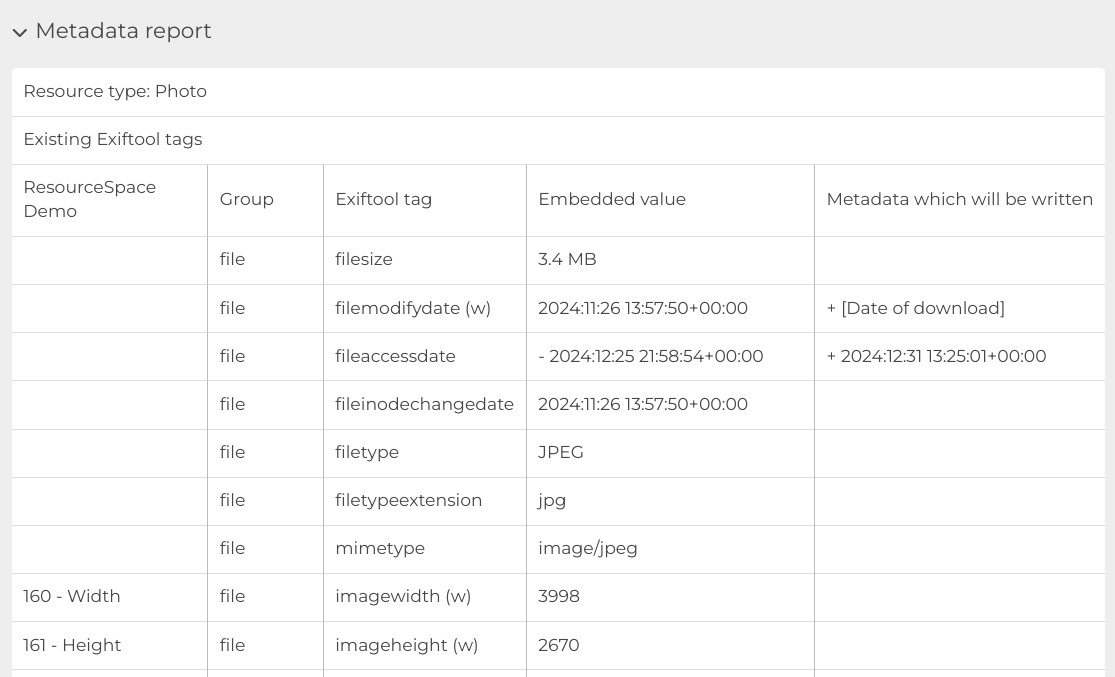
Using the report, you can also check which embedded metadata fields are being mapped into your ResourceSpace metadata template.
The Metadata report is enabled via Admin > System > Configuration > Metadata:

Once enabled, you’ll see an expandable tab at the bottom of each resource preview page, below the consent and licensing sections (if you're using those).
Many professional photographers use embedded metadata to add by-lines and other useful information about their work, so it can be worth checking metadata reports in case there’s anything you’d like to map into a field in ResourceSpace to make it searchable.
There’s usually a lot of technical information too, which can be useful to hold on to in some instances. For more tips around metadata mapping for both uploading into and downloading from ResourceSpace, see our full guide to metadata read/write mapping.