
ResourceSpace has changed the way the DEC uses content, making it much easier for us to quickly make assets available both internally and externally during our emergency appeals.

Our friendly team can guide you through how our extensive feature list can be tailored to your exact needs
Request a meetingWe’ll configure the perfect digital asset management system, carefully tailored to your sector
Request a meetingWe provide powerful DAM systems and bespoke consultancy and support to organisations of all types across the world.
Request a meetingBlog
27th February 2026
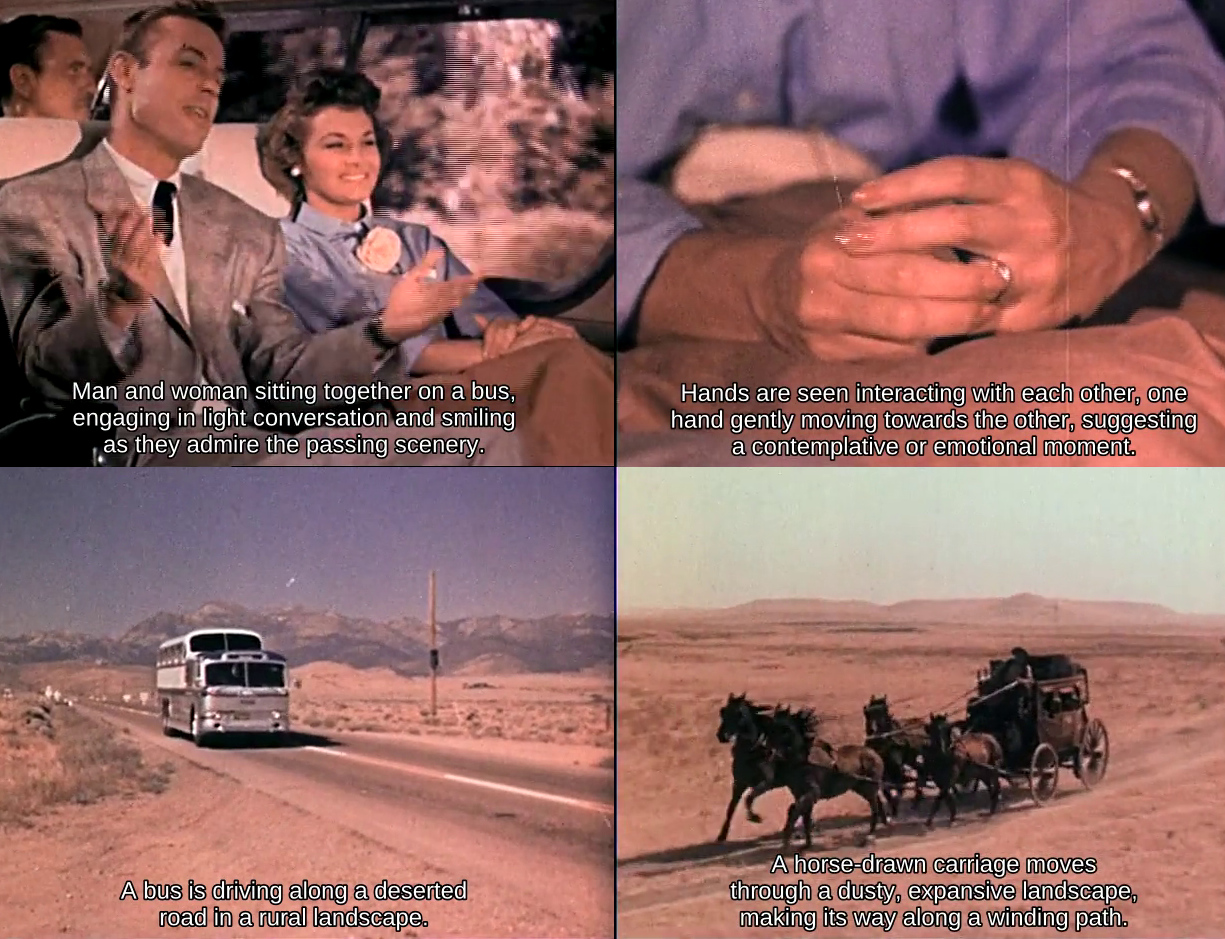
Over the past few weeks we’ve been exploring something that many DAM users have quietly wanted for years: a practical way to understand what’s actually inside long video files without having to watch them end-to-end.
We’ve now reached the point where this is not only possible, but reliable enough to be genuinely useful. I wanted to share a look at what we’ve built, how it works under the hood, and why it matters for ResourceSpace users.
Images are relatively easy to index. You can analyse a single frame and get a good sense of the subject. Video is different. A three-minute clip can contain dozens of distinct moments, and traditional metadata usually describes the file as a whole.
In practice this means:
important moments are buried inside long b-roll
accessibility descriptions are hard to produce at scale
search often misses relevant footage
editors still end up scrubbing manually through timelines
We wanted to see how far modern multimodal AI could take us toward solving this properly.
Before getting into the mechanics, it’s worth seeing the end result.
We now have a working pipeline that can take a long-form video, automatically break it into meaningful scenes, analyse both the visuals and any spoken audio, and produce concise, time-aligned descriptions for each segment. Those descriptions can then be surfaced in ResourceSpace in a variety of useful ways, including searchable metadata, narrative summaries, and subtitles overlaid directly onto the video preview.
In practical terms, this means a previously opaque three-minute b-roll clip can become something you can scan, search and understand in seconds.
Below is a short demonstration showing the system in action. The subtitles you see are generated automatically from the scene-by-scene analysis described in this article.
Archival film demonstrating scene description using audio transcription for additional context. The AI scene descriptions have been added as subtitles.
What’s particularly encouraging is not just that the technology works, but that it works consistently enough to be useful in real DAM workflows. From here, the rest of the challenge becomes one of engineering, performance and user experience, which is exactly where we like to be.
The first step is structural. Before you can describe a video, you need to understand where the meaningful visual changes occur.
We automatically segment videos into shots using an open-source shot boundary detection model. This gives us clean start and end points for each visual segment of the timeline.
Instead of treating a video as one opaque blob, we can work scene by scene.
The output from this process looks like this:
|
shot_id |
start_frame |
end_frame |
probability |
|
1 |
0 |
21 |
0.61131626367569 |
|
2 |
22 |
68 |
0.985623359680176 |
|
3 |
69 |
116 |
0.970582962036133 |
|
4 |
117 |
167 |
0.950193881988525 |
For every detected scene, ResourceSpace extracts nine evenly spaced frames and tiles them into a 3×3 grid. This turns a short video segment into something a vision model can interpret more effectively.
This step turns out to be surprisingly powerful. Rather than asking an AI to guess from a single frame, we give it a miniature visual progression - effectively a comic strip of the scene.


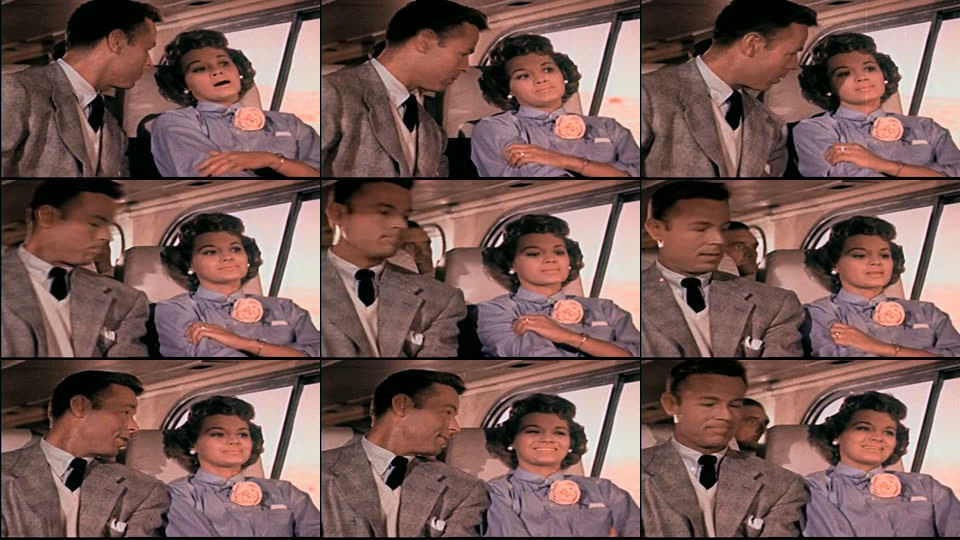
The model can then infer motion and context much more reliably, producing short factual summaries such as:
“Woman in red dress walking confidently down a busy city street.”
That alone is useful. But we didn’t stop there.
Many videos carry important context in the audio track such as names, locations, programme references, or spoken explanations.
Where audio is present, we automatically extract the matching segment and run speech-to-text locally. If useful speech is detected, the transcript is fed into the description prompt alongside the visual frames, so both the audio and visual aspects of the scene are used to create the description.
In practice this significantly improves accuracy in cases such as:
interviews
educational footage
field recordings
branded content with voiceover
Just as importantly, the system gracefully falls back to visual-only analysis when scenes are silent, which is common with b-roll.
A video showing the Montala office and team, with no audio transcription available, demonstrating inference using visuals only.
The transcription layer supports a wide range of languages out of the box, allowing ResourceSpace to work effectively with multilingual video collections. By default we generate English scene summaries for consistency and searchability across collections (which works even when the audio is in a language other than English) but the same pipeline can produce summaries in other languages where required, making the approach flexible for international teams and archives.
Raw AI output isn’t the goal. What matters is how it improves everyday workflows inside ResourceSpace.
From the same pipeline we can now generate:
scene-level video summaries
searchable narrative text
improved title, keyword and description generation
accessibility support material
Because everything is time-aligned, users can jump directly to the relevant moment inside a video rather than hunting manually.
The scene summary displayed in ResourceSpace. Timestamps are clickable and play the selected scene.
For many of the organisations we work with, particularly charities, cultural institutions and communications teams, video libraries are growing faster than their ability to catalogue them.
Scene-level understanding changes the equation.
It means:
long b-roll becomes searchable
accessibility workflows become more scalable
editors find usable moments faster
metadata quality improves without heavy manual effort
video archives become more discoverable
Importantly, this has been designed with real-world DAM scale in mind. The pipeline uses efficient open-source components and can run locally on a server with a GPU (such as in our own data centres) which keeps it practical for organisations that need to retain control over where their data is processed, as well as managing costs and compliance requirements.
What we have today is already producing strong results in testing, and we’re continuing to refine performance, batching and user experience before rolling this into the ResourceSpace platform.
As with many of our AI developments, the goal isn’t novelty. It’s dependable, explainable tooling that genuinely reduces manual effort for our users.
We’ll share more as this moves toward release, but it’s fair to say that video inside ResourceSpace is about to become much more searchable and much easier to work with.
If you’re an existing customer, we’d love to hear your thoughts and whether this is something you’d like to explore in your own ResourceSpace system.
The archival clip used in this post is taken from "Freedom Highway" by Fairbanks (Jerry) Productions, 1956 and is in the public domain.
#ProductUpdates
#LegalCompliance
#IndustryNews
#ResourceSpaceTips
#BestPractice
#AI
#Metadata
#UserExperience
#Accessibility
#SearchOptimization
#VideoContent
#ContentManagement
ResourceSpace has changed the way the DEC uses content, making it much easier for us to quickly make assets available both internally and externally during our emergency appeals.

The ResourceSpace team has been exceptionally good at support services. They make everything so convenient and efficient with the cutting edge technology. Kudos to the team.